Why Usability is the Key to Successful User Experience 

In today’s digital landscape, where users have countless options at their fingertips, creating a product that is not just functional but also usable has become more important than ever. Many websites focus solely on delivering information, but to truly be successful you have to create an experience that’s both engaging and efficient for users. 

Understanding Usability 

Usability goes beyond just making a functional product, it’s about creating interfaces that users can navigate efficiently. It is about making sure that users can accomplish their goals and tasks with minimal problems or confusion. Good usability allows users to focus on their objective rather than struggling with the interface. Usability is defined by 5 key components

1. Learnability: How easy is it for users to accomplish basic tasks? 

2. Efficiency: Once users have learned the design, how quickly can they perform tasks? 

3. Memorability: How easily can returning users pick up where they left off? 

4. Errors: How many errors do users make, how bad are these errors, and how can you recover from them? 

5. Satisfaction: How enjoyable is the overall user experience? 
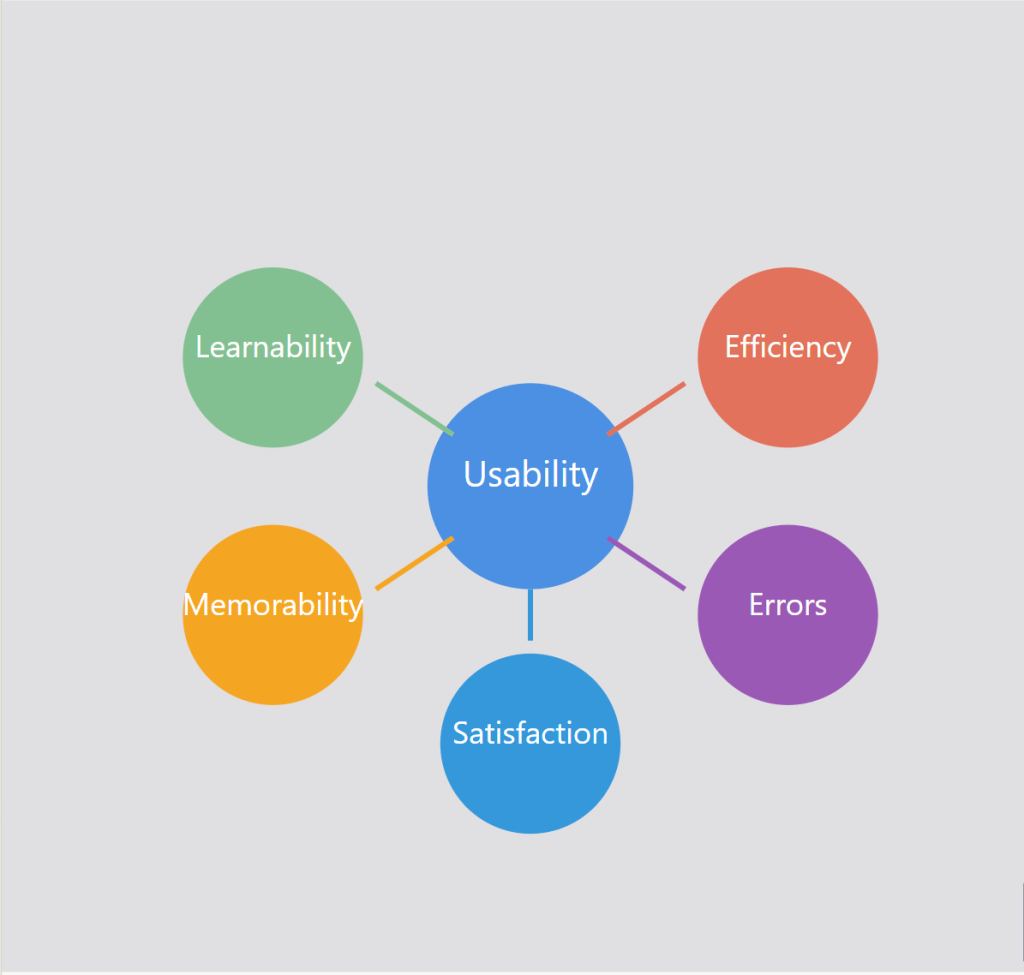
Figure 1: The five key attributes of usability that contribute to great user experiences

The Importance of Usability 

While having nice features and visually appealing aesthetics are important, usability is the foundation that allows users to successfully engage with a product or service. It is the most important aspect of a website that is not seen. Without strong usability, even the most beautifully designed app will not be successful. Usability is necessary for survival in today’s digital landscape. There are many reasons as to why usability is so important: 

  • Improved User Satisfaction: Designs that are efficient and have no friction lead to happier, more satisfied users. When users have positive experiences using your product or service, it makes customers want to come back. 
  • Increased Productivity: Efficient interfaces allow users to find what they are looking for and accomplish their goals more quickly with less friction and frustration.  
  • Reduced Errors and Support Costs: A well-designed system with clear navigation and functionality will minimize errors, which will lower the need for customer support.  
  • Competitive Advantage and Brand Trust: In many different industries, usability can be a key differentiator between them. Products and services that are easier and more enjoyable to use will win over other competitors. Usability can directly influence how users perceive your brand. A smooth experience using your product or service builds trust and encourages users to return. 
  • Accessibility: Allowing people with disabilities to not only access but understand, navigate and interact with the product or service is a win. Having strong usability principles, such as keyboard accessibility and screen readers, helps ensure that products are usable by people with disabilities.  

Measuring and Improving Usability 

Having good usability isn’t something that can be achieved through guesswork or assumptions. It requires a user centric approach that involves testing, iterating, and continuous improvement. Collecting actual measurements is a natural step in improving usability and the path to excellent usability requires: 
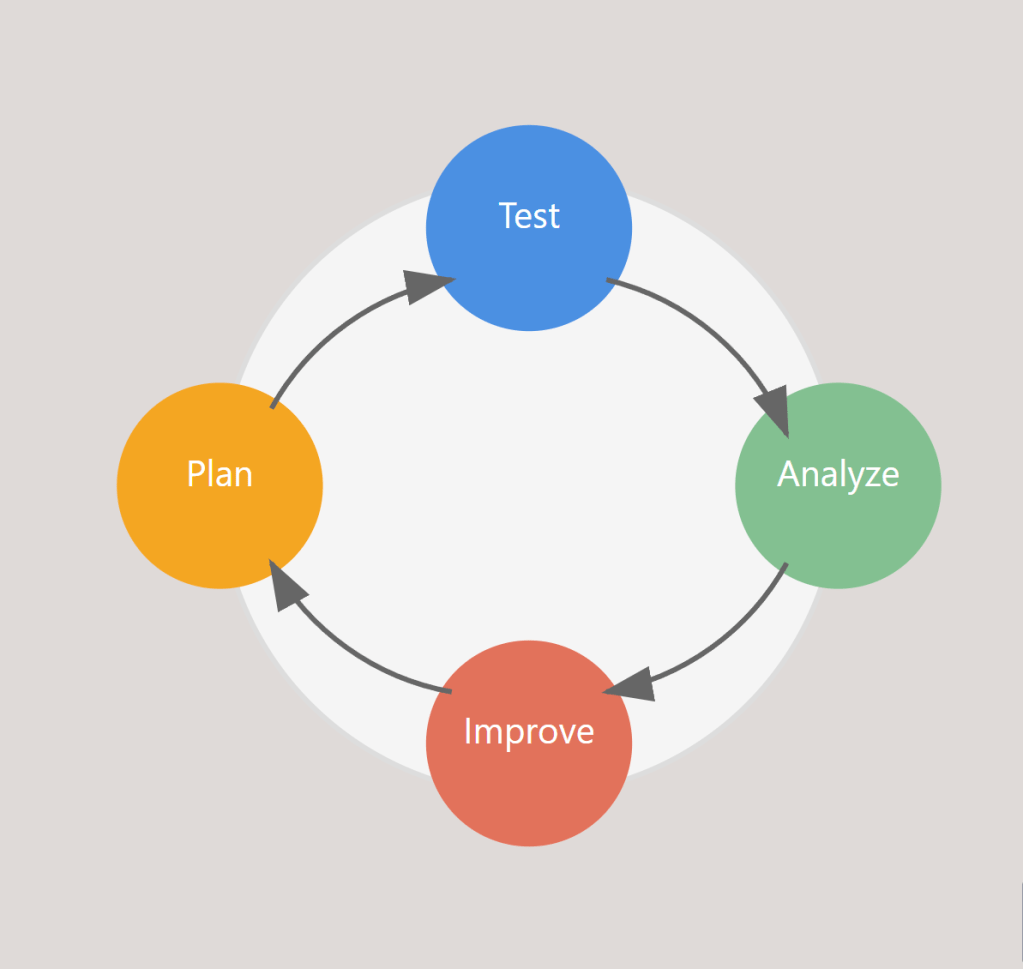
Figure 2: The continuous cycle of measuring and improving usability

  • Goal-Directed Analysis: Start by identifying specific objectives like “Can users easily find products?” or “Are calls to action effective?” 
  • Usability Testing and A/B Testing: Observe real users navigating through your platform and gather feedback from them as they complete tasks. Comparing the performance of different design variations using A/B Testing while observing users will also help improve usability.  
  • Iterative Improvement: Continuously refining and improving based on feedback gathered is another key to making good usability. 
  • Performance Monitoring: Tracking metrics and analytics helps analyze user behavior data to identify pain points and opportunities for improvement.  

By incorporating usability testing and feedback throughout the design process, product teams can identify and address any issues with usability early on, which leads to more successful, user-friendly outcomes. 

Putting Usability First 

In today’s crowded digital landscape, prioritizing usability has become a critical part in a product or services success. By ensuring that your designs are intuitive, efficient, and satisfying, you are setting your users up for success and ultimately setting your business up for success as well. Whether you are developing a website, app, or digital service, remember that usability affects everything from SEO to site speed, and brand perception to end results. By investing in usability, you’re not just building a better product, you’re building a stronger business. Usability may be something working behind the scenes, but it definitely has a critical role to play. 

The Power of Information Architecture 

In the digital landscape we interact with daily, some websites and apps feel easy to use, while others leave us lost and frustrated. The reason for this is often because of the Information Architecture (IA). IA is very important but also an overlooked aspect of design. IA is the practice of organizing and structuring content in digital products and systems, like websites or apps, in a way that is easy for users to use and understand. In today’s world, where users are bombarded with information at every turn, effective IA is becoming more and more important. It’s not just about aesthetics, it’s about making the information accessible, understandable, and user-friendly. 

What is Information Architecture?

IA is the practice of organizing content to make it easy to understand. It serves as the behind-the-scenes framework that helps users find what they are looking for by laying out content like websites and apps in a clear and concise way.  

At its core, IA is about making sense of the vast amount of information given. It is like being a librarian for digital information, categorizing and arranging information so that users can find what they need efficiently. Good IA anticipates what the users need and creates clear ways for users to find what they are looking for, which makes the overall experience much better. 

IA Building Blocks

The foundation of Information Architecture consists of 4 main components: 

  1. Organization Systems: This involves categorizing and grouping information to make the product easy to use. 
  1. Labeling Systems: These are the words or icons that are used to represent information. They help distinguish what users will find in different sections of the product. 
  1. Navigation Systems: This is how users move throughout the product. It includes menus, search functions, and other tools that will help users navigate the product and find what they are looking for. 
  1. Search Systems: While this is a part of navigation, it deserves its own spot. A well-designed search function can make navigating through the product much more efficient, especially on sites or apps that have a lot of content.  

These building blocks work together to make the product user-friendly. With a foundation that includes these building blocks, designers can create products that are easy to understand and easy to navigate, regardless of how complex or how much information they have. 

IA Best Practices and Implementation

In order to create effective Information Architecture, designers should follow these practices and techniques

  1. Get to know your audience: Understand the users’ needs through various research methods. 
  1. Create a hierarchy that is clear: Organize the information from general to specific, which involves creating visual representations of a website’s structure and content. 
  1. Use labeling: Group and label your information into categories to make it easier for users to find what they need. 
  1. Content Inventory: Review all content to make sure it is organized and accessible. This helps in creating a structure that is user-friendly. 

By applying these practices and techniques, designers can create effective information structures that enhance user experience. This approach can help make sure that the final product is well-organized but also made with the users’ needs and expectations in mind.  

The Impact of IA on User Experience

Good Information Architecture enhances user experience in many different ways: 

  1. Well-structured IA makes it easier for users to locate the information they need efficiently, which increases user satisfaction. 
  1. When content is well-organized, users can complete their tasks more efficiently, which saves a lot of time and leads to a more positive interaction with the product.  
  1. When users can go through a website or app without complications and at ease, they are more likely to have a positive experience. 
  1. A product that is structured well can often appear more trustworthy and can help build trust with the brand that is behind the product. 

By focusing on creating good IA, designers can greatly improve the overall user experience. 

Challenges in IA

IA has many challenges in today’s world. Managing information without making the users feel overwhelmed is a big challenge, especially when you must cater to many different groups of people where they all have different needs. The evolution of content needs systems that are flexible and can adapt quickly. Designers must also try to balance the goals for the business with the needs of the users, creating an IA that can serve both.  

Organizing your content with the use of IA is very important to make sure you don’t have navigation issues where your users can’t find what they are looking for or take too long to find it. Designers want it to be as user-friendly and efficient as possible, but this continues to be a challenge as digital products grow in complexity and scale. 

The Future of IA

Technology is always evolving and so is Information Architecture. AI is something that is expected to change how we organize and access information, hopefully making it even more efficient. Augmented and virtual reality will also change IA to develop new ways of presenting information in 2D and 3D digital environments. These trends will shape IA’s role in making digital information even more accessible and useful. 

Overall, IA plays a very important role in the digital landscape that we interact with on a day-to-day basis. By thoughtfully organizing content, IA not only makes information more understandable and efficient but also makes it overall more user-friendly and accessible. Prioritizing good IA will be essential for creating user-friendly products. The integration of AI and virtual reality will change how we structure and access information even more. Ultimately, the distinction between good IA and bad IA can be the deciding factor in a products success.