My Experience in Professional Practices in Interactive Media

What Surprised Me 

The thing that surprised me the most was that I knew that developing a presence is important and was something I was already doing but I didn’t know how much I was missing to make my presence even stronger. I had a website already but because of this class I have improved it and improved my LinkedIn account as well. I had a lot of important things missing or that needed work done and because of this class, I have improved on a lot of things concerning my professional presence. 

How Will I Apply This Class to My Professional Life 

This class has many things that will be applied to my professional life. Almost every assignment will be applied to it. My business card, research on careers, my resume, and website, just to name a few, will all help me in the future.  

Skill and Knowledge This Course Suggested I Needed  

This class taught me that I still have a lot of things to work on. One of the things that taught me that was learning that the career choices I am interested in have a lot of competition and I am going to have to set myself apart from others and gain more knowledge and skills to get the job/jobs I want. There are some technical skills that I need to learn like software to learn and how to do better research and be more efficient on my work, but a lot of the skills I need to improve on are the people skills and getting more connections in my industry and overall improving my professional presence. I also need to work on my time management skills as that is something I struggle with in general and also something this course has shown me I needed to improve. 

How Can I Improve These Skills and Knowledge 

Technical skills will be easier to improve as that will just take practice and time to learn new skills. The people skills and better professional presence will also take practice and time but will also challenge me more to put myself out there more and put myself in situations where I would use these skills. I will have to go out of my way to chase these improvements which will take longer but will be worth it in the end. There is a lot of research I could do on how to improve specific skills or find out what I need to do which I will need to look at to help prepare me for the real world and my career choice. It all just comes down to putting myself out there and putting in the work.  

An Important Thing I Learned 

The biggest thing I learned is that professional presence and connections are more important than I initially thought, making it very good that I realized this before getting into the real world.  

Something I Wish Was Included 

This isn’t really about the subject matter in the class but its how I took the class. I had to take it online in a completely different setting alone which made this class much harder and less helpful so a lot of the work and things I needed to learn were on me to learn which can be a bad thing and a good thing. There was a lot of information I missed out on having taken it online and made a class that is typically one of the more important classes because it helps set you up for after graduation less impactful because I didn’t get the full experience. Overall, my experience in this class was okay, I just wish I didn’t have to take it online like I did. 

My Experience in User Experience Fundamentals

What I Liked 

The thing I liked most about this class was the fact that we got to work on making a prototype of an app. I have always been interested in making and designing things, especially apps and games and in this class, I was able to design a prototype for an app that had game like features, so it worked towards both of my interests. Creating everything from the beginning with not much knowledge on how to do so was challenging but also very fun. I got to learn more about designing things, which is something I also enjoyed. I also liked doing the topic posts, at times they felt very tedious, but it was fun researching these topics and writing about them as they all allowed me to learn more about things I am interested in. 

What I Didn’t Like 

What I didn’t like about this class was the number of little assignments mixed in with the big assignment. I did enjoy the topic posts but sometimes it just felt like it was just adding to the stress even if I learned some things from it. Time management with this class and others became a big struggle for me. Learning Figma from scratch was also hard but fun to learn in the end but still, added to that stress of time management with all the things I had to do and learn. 

What I Learned  

I learned a lot in this class, from the technical, and hands on experience to the LinkedIn learning courses we took, I ended up learning about things I had little to no experience with which was great because I would probably end up using the things I learned to help me in the future with my career. I got to learn a lot with the topic posts too which was nice. Learning Figma and how the app building process works was by far the most interesting and fun, as that was a more hands on experience.  

What I Wish I Learned  

I know this was the first time learning Figma for most if not everyone in the class but learning some more advanced tips or just more advanced things for not only app designing but in general would’ve been nice so I would be more knowledgeable for the future. 

What I Didn’t Take Seriously Enough 

Something I didn’t take seriously enough, and this goes for all my classes, is time management. I struggle with managing my time throughout all of my classes, as a lot of assignments at once can stress me out.  

How I’ll Apply This to My Career 

This class showed me a lot of things, from designing an app and its IA, to usability and accessibility, to user testing, to building a working app. One of my career choices and something I am interested in is UX design so all the things I have learned in this class will be helpful in some way. This class is actually what made me consider UX design in the first place. Something that this class has taught me that will help me in whatever career I chose will be project management and making sure things are delivered on time and done on time, along with working under pressure. This class is a class that has had one of the biggest projects I have had so it taught me a lot in that sense. I plan to continue to build the skills and knowledge that I have gained from this class on my own, as I am sure they will help in the future. Overall, I had a good experience with this class and made some friends along the way too. 

Why Accessibility Should be Your First Priority 

Imagine you are trying to read an important email on your phone while walking down a street and the sunlight hits you, making you squint at the screen and struggle to tap the tiny reply button. Or maybe you’re trying to order food online while holding something in your other hand, trying to navigate a complex menu with one hand. These aren’t just usability issues; they’re accessibility issues that everyone faces daily. While we often think of accessibility in terms of disabilities, the truth is that creating designs that are accessible isn’t about accommodation, but about building a better experience for everyone, no matter the situation. 

What is Accessibility? 

While accessibility is often confused with usability, they serve different yet complementary purposes. Usability focuses on whether or not your design is effective and efficient, while accessibility makes sure that all users can experience your product in the same way, regardless of their circumstances. Think of accessibility as the foundation where good usability is built. 

According to the World Health Organization, approximately 15% of the global population has some form of disability. However, the reach of accessibility extends far beyond this segment. Every user, regardless of their abilities, encounters challenge that accessibility features can help. 

Spectrum of Needs 

Accessibility considerations fall into many key categories, and understanding these needs helps us create more inclusive designs that can work for everyone: 

Physical and Sensory Needs: 

  • Visual Impairments (from color blindness to complete vision loss) 
  • Motor/mobility challenges 
  • Auditory difficulties 
  • Seizure Triggers 

Contextual and Situational Needs: 

  • Environmental Constraints (bright sunlight, noisy surroundings) 
  • Device Limitations (mobile screens, slow internet) 
  • Temporary Impairments (injuries, fatigue) 
  • Cognitive load (stress, multitasking) 

Why Accessibility Should Come First 

When you start with accessibility, you’re not just meeting a requirement, you’re creating better designs for everyone. 

  1. Universal Benefits: Features designed for accessibility often improve everyones experience. For example, video captions help both hearing imparied users and those watching in noisy environments.  
  1. Business Impact: Beyond being moral, accessible design makes business sense. It expands your market reach, improves SEO, and enhances your brand’s public image. 
  1. Future-Proofing: Designing with accessibility in mind creates greater adaptable interfaces that work across many different devices, situations, and contexts. 

Steps Forward 

To make accessibility a priority in your design process: 

  • Begin with empathy and user research 
  • Ensure proper color contrast and text that people can read 
  • Implement keyboard navigation options 
  • Provide text for images and media 
  • Structure content with clear headings and a flow that makes sense 
  • Test your designs in various situations and environments 

The Path Forward 

Accessibility isn’t some box that you have to check, it is a fundamental approach to design that will benefit everyone. By making it your first priority when making and designing a product, you’re not just designing for compliance, you’re designing for anyone and everyone to be able to have a good experience with your product. 

Why Usability is the Key to Successful User Experience 

In today’s digital landscape, where users have countless options at their fingertips, creating a product that is not just functional but also usable has become more important than ever. Many websites focus solely on delivering information, but to truly be successful you have to create an experience that’s both engaging and efficient for users. 

Understanding Usability 

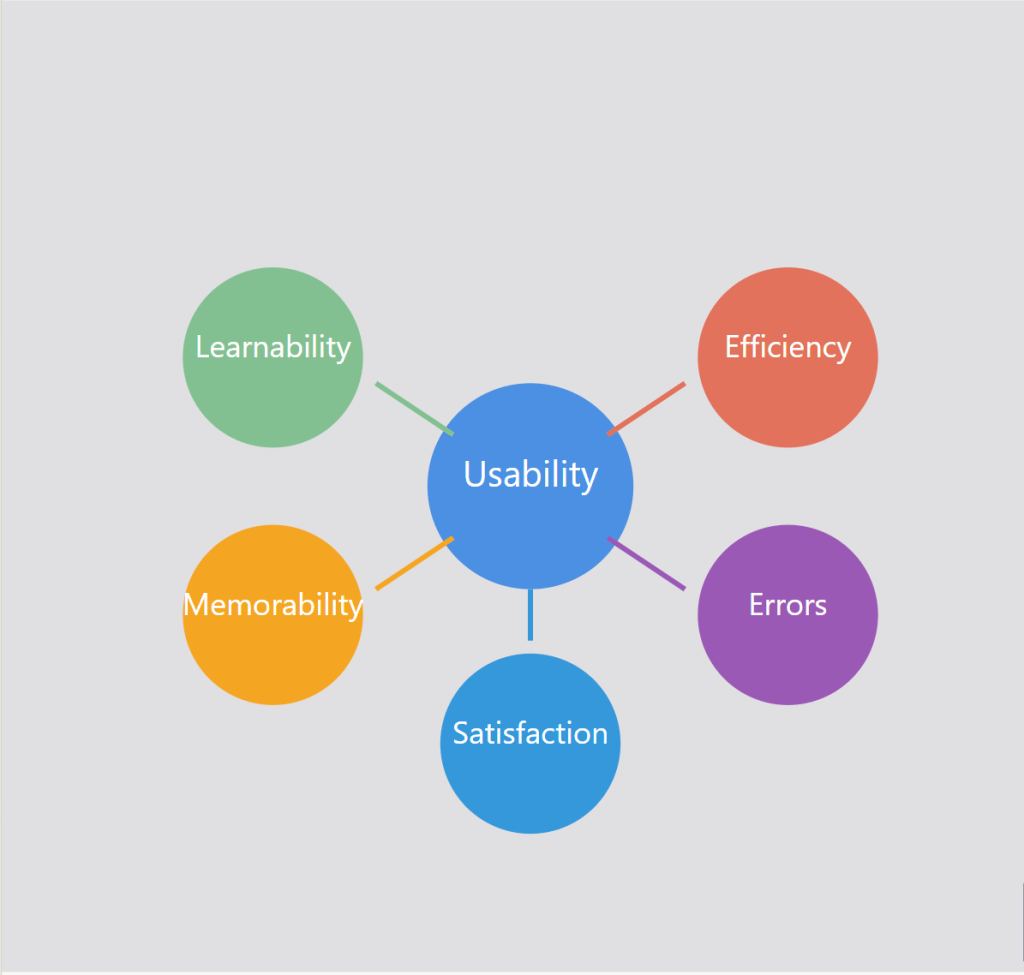
Usability goes beyond just making a functional product, it’s about creating interfaces that users can navigate efficiently. It is about making sure that users can accomplish their goals and tasks with minimal problems or confusion. Good usability allows users to focus on their objective rather than struggling with the interface. Usability is defined by 5 key components

1. Learnability: How easy is it for users to accomplish basic tasks? 

2. Efficiency: Once users have learned the design, how quickly can they perform tasks? 

3. Memorability: How easily can returning users pick up where they left off? 

4. Errors: How many errors do users make, how bad are these errors, and how can you recover from them? 

5. Satisfaction: How enjoyable is the overall user experience? 

Figure 1: The five key attributes of usability that contribute to great user experiences

The Importance of Usability 

While having nice features and visually appealing aesthetics are important, usability is the foundation that allows users to successfully engage with a product or service. It is the most important aspect of a website that is not seen. Without strong usability, even the most beautifully designed app will not be successful. Usability is necessary for survival in today’s digital landscape. There are many reasons as to why usability is so important: 

  • Improved User Satisfaction: Designs that are efficient and have no friction lead to happier, more satisfied users. When users have positive experiences using your product or service, it makes customers want to come back. 
  • Increased Productivity: Efficient interfaces allow users to find what they are looking for and accomplish their goals more quickly with less friction and frustration.  
  • Reduced Errors and Support Costs: A well-designed system with clear navigation and functionality will minimize errors, which will lower the need for customer support.  
  • Competitive Advantage and Brand Trust: In many different industries, usability can be a key differentiator between them. Products and services that are easier and more enjoyable to use will win over other competitors. Usability can directly influence how users perceive your brand. A smooth experience using your product or service builds trust and encourages users to return. 
  • Accessibility: Allowing people with disabilities to not only access but understand, navigate and interact with the product or service is a win. Having strong usability principles, such as keyboard accessibility and screen readers, helps ensure that products are usable by people with disabilities.  

Measuring and Improving Usability 

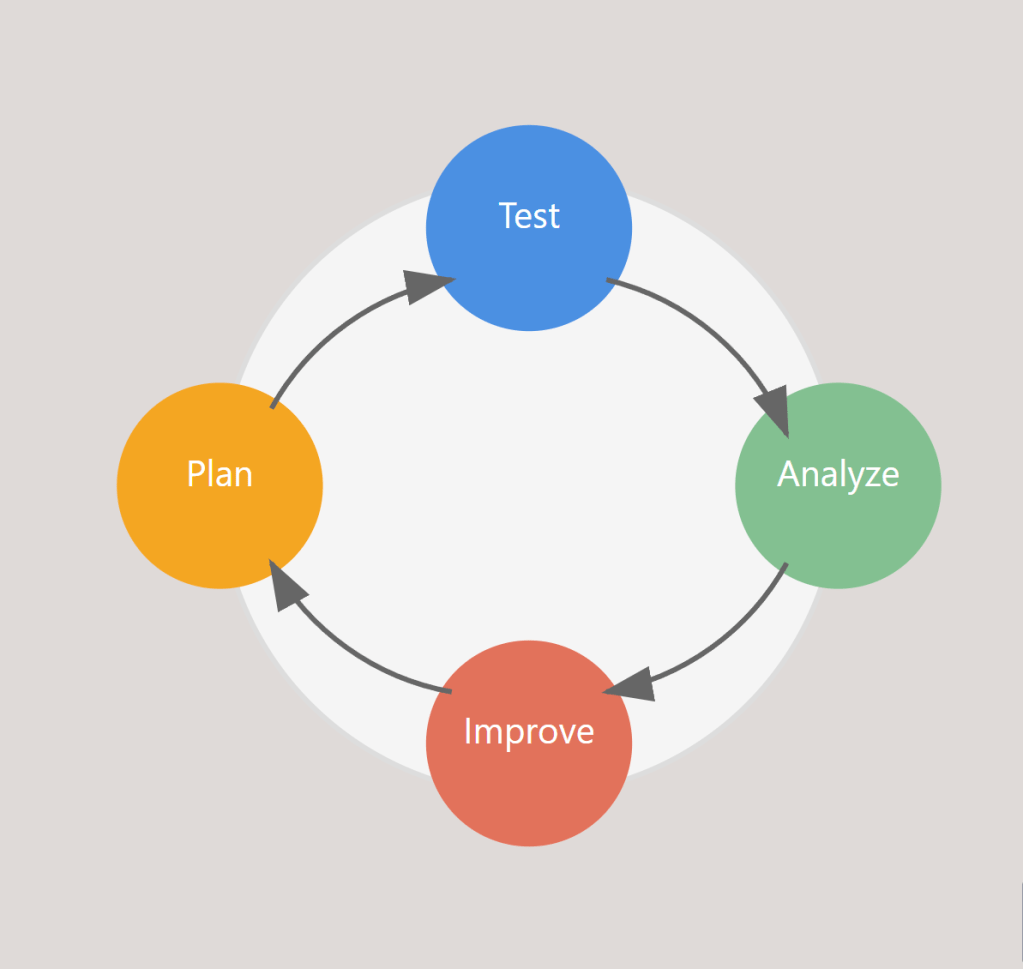
Having good usability isn’t something that can be achieved through guesswork or assumptions. It requires a user centric approach that involves testing, iterating, and continuous improvement. Collecting actual measurements is a natural step in improving usability and the path to excellent usability requires: 

Figure 2: The continuous cycle of measuring and improving usability

  • Goal-Directed Analysis: Start by identifying specific objectives like “Can users easily find products?” or “Are calls to action effective?” 
  • Usability Testing and A/B Testing: Observe real users navigating through your platform and gather feedback from them as they complete tasks. Comparing the performance of different design variations using A/B Testing while observing users will also help improve usability.  
  • Iterative Improvement: Continuously refining and improving based on feedback gathered is another key to making good usability. 
  • Performance Monitoring: Tracking metrics and analytics helps analyze user behavior data to identify pain points and opportunities for improvement.  

By incorporating usability testing and feedback throughout the design process, product teams can identify and address any issues with usability early on, which leads to more successful, user-friendly outcomes. 

Putting Usability First 

In today’s crowded digital landscape, prioritizing usability has become a critical part in a product or services success. By ensuring that your designs are intuitive, efficient, and satisfying, you are setting your users up for success and ultimately setting your business up for success as well. Whether you are developing a website, app, or digital service, remember that usability affects everything from SEO to site speed, and brand perception to end results. By investing in usability, you’re not just building a better product, you’re building a stronger business. Usability may be something working behind the scenes, but it definitely has a critical role to play. 

The Power of User Research 

Creating good products isn’t just about having good ideas, it’s about understanding your users and their needs. User research is a vital part of the user experience design process that guides designers and product teams toward creating solutions that solve real problems. It is typically done at the start of a project and consists of different types of research methods to gather data and feedback. When using this approach, designers can identify exactly what their users want, what issues they have, and what would make their overall experience better, making sure that decisions are based on real insights rather than assumptions or guesswork. 

What is User Research? 

User experience research is the systematic study of your users to gather insights that will guide the design process. During the user research phase, UX designers and/or researchers use various methods to gather data about their users. With user research, you discover who you are designing for and why, what problems your users encounter, and what your users need and/or want from your product or service. 

Types of User Research Methods 

User research usually falls into two main types of research methods

Qualitative Research 

This type of research aims to capture how your users think and feel about their experiences with a particular product or service, while also uncovering their motivations and behaviors. It includes: 

  • User Interviews: One-on-one conversations with users to understand their thoughts, feelings, and experiences. 
  • Field Studies: Observations done in the users’ natural environment to see how they interact with products. 
  • Focus Groups: Group discussions that provide insights into user needs and perspectives. 
  • Contextual Inquiry: Observing and interviewing users in their work environment. 

Quantitative Research 

This type of research involves collecting numerical data and analyzing it to identify patterns and trends, providing statistical insights. It includes: 

  • Analytics: Analyzing user behavior through website or app usage data. 
  • Surveys: Gathering numerical data about user preferences and behaviors. 
  • A/B Testing: Comparing different versions of a design to see which performs better. 
  • Heat Mapping: Visualizing where users click and interact with product interfaces. 

When to Conduct User Research 

Conducting user research is more impactful the earlier you do it. It is valuable throughout the whole design process, but it is the most effective when done at the start because it allows you to understand the users’ needs and wants before the design begins. With that said, doing research at all the stages will prove just as useful when designing a product. It will help validate any design decisions being made and allow you to change anything you want to change based on user feedback. It could also be useful to get some insight into how users interact with the final product to see if your product is successful. 

The Benefits of User Research 

  1. Saving Time and Money 

Some people might think that skipping research will actually save you more time and money, but it won’t. Skipping research could potentially lead to greater and more expensive problems later. Identifying problems early by using research is much more cost-effective than having to scrap your whole product and start from scratch. 

  1. Better Decision Making 

Conducting user research allows you to base your designs on actual data and insights about your users instead of relying on guesswork and assumptions. This makes sure you are designing with your users in mind which helps designers focus on solving the right problems. 

  1. Builds User Empathy and Satisfaction 

It is about putting yourself in the users’ shoes and understanding how they might experience your product. When you understand your users’ needs and wants, you can create products that truly benefit them and products they will like. 

  1. Leads to a Better Product 

Conducting good user research is essential if you want good UX. Understanding what your users need and want allows you to provide them with a better experience overall when using your product or service. Without investing in user research, creating a product that truly caters to the needs and wants of your users will be challenging. 

How to Get Started with User Research 

When starting, it is essential to: 

  1. Choose the Right Methods: Different methods will provide different insights. You need to determine what kind of data will be most useful for you and your goals. 
  1. Use Tools: You want to make sure you have the right tools and software for recruiting participants, conducting user research, and analyzing your data. 
  1. Turn Findings into Action: After conducting your research, you want to take out key findings and turn them into actionable insights that can inform your decision-making process for your design. 

User research isn’t just another step in the design process, it’s one of the most important ones. It is what helps you create products that users love. While it does require an investment of time, money, and resources, the information and insights gained through it are invaluable. They help designers and teams avoid costly mistakes later in the design process, create better designs, and ultimately build a great product that will truly meet the needs and wants of the user. The most successful products aren’t built through assumptions or guesswork, they are built through a deep understanding of user needs, behaviors, and preferences.  

The Power of Information Architecture 

In the digital landscape we interact with daily, some websites and apps feel easy to use, while others leave us lost and frustrated. The reason for this is often because of the Information Architecture (IA). IA is very important but also an overlooked aspect of design. IA is the practice of organizing and structuring content in digital products and systems, like websites or apps, in a way that is easy for users to use and understand. In today’s world, where users are bombarded with information at every turn, effective IA is becoming more and more important. It’s not just about aesthetics, it’s about making the information accessible, understandable, and user-friendly. 

What is Information Architecture?

IA is the practice of organizing content to make it easy to understand. It serves as the behind-the-scenes framework that helps users find what they are looking for by laying out content like websites and apps in a clear and concise way.  

At its core, IA is about making sense of the vast amount of information given. It is like being a librarian for digital information, categorizing and arranging information so that users can find what they need efficiently. Good IA anticipates what the users need and creates clear ways for users to find what they are looking for, which makes the overall experience much better. 

IA Building Blocks

The foundation of Information Architecture consists of 4 main components: 

  1. Organization Systems: This involves categorizing and grouping information to make the product easy to use. 
  1. Labeling Systems: These are the words or icons that are used to represent information. They help distinguish what users will find in different sections of the product. 
  1. Navigation Systems: This is how users move throughout the product. It includes menus, search functions, and other tools that will help users navigate the product and find what they are looking for. 
  1. Search Systems: While this is a part of navigation, it deserves its own spot. A well-designed search function can make navigating through the product much more efficient, especially on sites or apps that have a lot of content.  

These building blocks work together to make the product user-friendly. With a foundation that includes these building blocks, designers can create products that are easy to understand and easy to navigate, regardless of how complex or how much information they have. 

IA Best Practices and Implementation

In order to create effective Information Architecture, designers should follow these practices and techniques

  1. Get to know your audience: Understand the users’ needs through various research methods. 
  1. Create a hierarchy that is clear: Organize the information from general to specific, which involves creating visual representations of a website’s structure and content. 
  1. Use labeling: Group and label your information into categories to make it easier for users to find what they need. 
  1. Content Inventory: Review all content to make sure it is organized and accessible. This helps in creating a structure that is user-friendly. 

By applying these practices and techniques, designers can create effective information structures that enhance user experience. This approach can help make sure that the final product is well-organized but also made with the users’ needs and expectations in mind.  

The Impact of IA on User Experience

Good Information Architecture enhances user experience in many different ways: 

  1. Well-structured IA makes it easier for users to locate the information they need efficiently, which increases user satisfaction. 
  1. When content is well-organized, users can complete their tasks more efficiently, which saves a lot of time and leads to a more positive interaction with the product.  
  1. When users can go through a website or app without complications and at ease, they are more likely to have a positive experience. 
  1. A product that is structured well can often appear more trustworthy and can help build trust with the brand that is behind the product. 

By focusing on creating good IA, designers can greatly improve the overall user experience. 

Challenges in IA

IA has many challenges in today’s world. Managing information without making the users feel overwhelmed is a big challenge, especially when you must cater to many different groups of people where they all have different needs. The evolution of content needs systems that are flexible and can adapt quickly. Designers must also try to balance the goals for the business with the needs of the users, creating an IA that can serve both.  

Organizing your content with the use of IA is very important to make sure you don’t have navigation issues where your users can’t find what they are looking for or take too long to find it. Designers want it to be as user-friendly and efficient as possible, but this continues to be a challenge as digital products grow in complexity and scale. 

The Future of IA

Technology is always evolving and so is Information Architecture. AI is something that is expected to change how we organize and access information, hopefully making it even more efficient. Augmented and virtual reality will also change IA to develop new ways of presenting information in 2D and 3D digital environments. These trends will shape IA’s role in making digital information even more accessible and useful. 

Overall, IA plays a very important role in the digital landscape that we interact with on a day-to-day basis. By thoughtfully organizing content, IA not only makes information more understandable and efficient but also makes it overall more user-friendly and accessible. Prioritizing good IA will be essential for creating user-friendly products. The integration of AI and virtual reality will change how we structure and access information even more. Ultimately, the distinction between good IA and bad IA can be the deciding factor in a products success. 

The Evolution of Reality

Imagine a world where the boundaries between the physical and digital realities blur, where you can see objects and information floating in front of you, and where you can enter whatever digital environment you want to. This might sound like science fiction, but this is already happening thanks to technologies such as Virtual Reality (VR), Augmented Reality (AR), and Mixed Reality (MR). These technologies are quickly evolving, changing the way we work, learn, play, and interact with the world around us. From the use of VR headsets that allow us to explore new worlds and enter new realities, to AR apps that show information onto our physical surroundings, to MR that blends the real world and virtual world, we are now entering an era populated by human-computer interaction. As these technologies evolve, they aren’t just changing what we see, but they’re also changing how we experience and interact with the world around us.

Defining the Reality Spectrum

Before diving into their potential, we must first understand what VR, AR, and MR are. Virtual Reality (VR) is the most popular and most known out of the three, being used in gaming, education, and industry. It immerses the user in a digital environment, fully disconnecting them from the physical world around them. Augmented Reality (AR) overlays digital information and/or objects onto the real world, with the means of enhancing the way we interact with our physical environment. Mixed Reality (MR) blends real world and digital elements, allowing the user to not only see the digital information and content like AR does but also allows the user to interact with digital objects in a physical space like you can in VR.

Current State and Uses of Technologies

Today’s current state of VR/AR and MR offer many different ways that the digital world can blend with our physical world, with each technology finding a specialized use across industries.

VR, used with devices like the Meta Quest 2, allows the user to experience a fully immersive virtual world. VR excels in gaming and entertainment currently, but it is also finding its way into education, healthcare, and training for jobs. Surgeons could practice procedures, people can go to therapy and work on their phobias in a controlled environment, and workers can go through safety training risk free in virtual environments. The user experience in VR is unique, because it completely replaces the user’s visual and auditory senses. The immersion that VR can bring can lead to a strong sense of presence, like you are really there, but it can also cause motion sickness which is a big problem UX designers need to look at when it comes to VR.

AR has become widely used in smartphone apps, allowing us to enhance our viewing of the real world with digital information or overlays. Although, there are popular games like Pokémon Go that are examples of the use of AR, AR is also being used in retail with virtual try-on experiences, aiding with directions in real time, helping surgeons by assisting them during complex surgeries, and making immersive learning experiences for students. AR’s user experience is all about blending digital information into the real world. UX designers focus on creating interfaces that don’t overwhelm the user’s natural interaction with the environment.

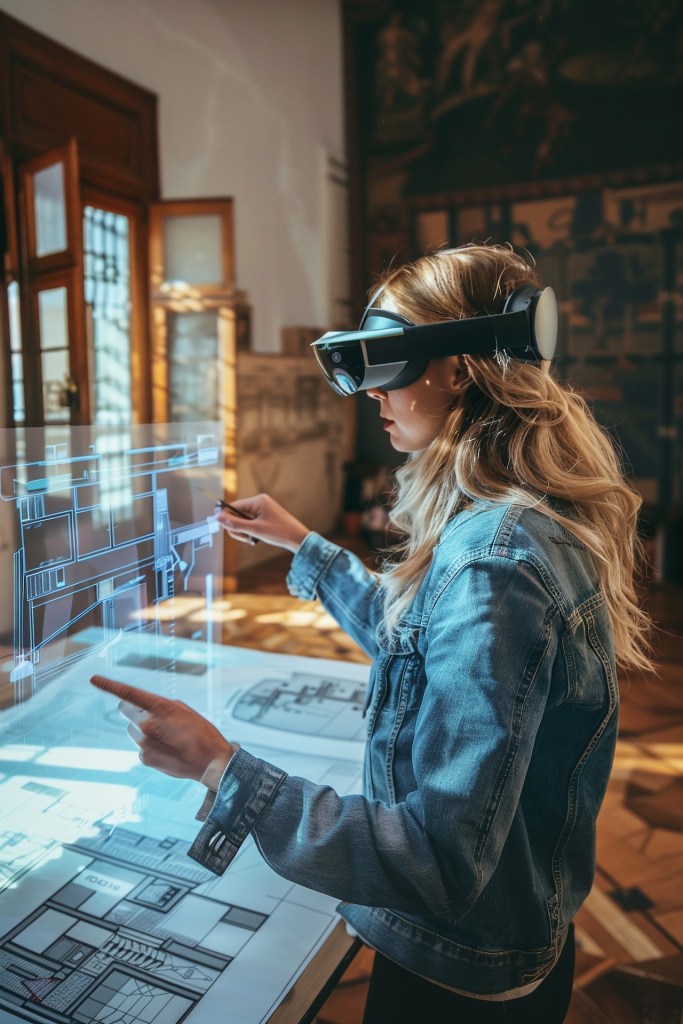
MR, used with Microsoft’s HoloLens 2, can blend virtual objects with your physical space. It is playing a critical role in industrial and architectural design, allowing them to interact with 3d models in real time which not only helps in general but can help with the creative process as well. It is also being used in maintenance and repair, where they can work on machinery with digital instructions. MR is currently more limited than AR and VR as it isn’t as accessible because of hardware and cost. MR presents the most difficult UX challenge of blending digital and physical interactions. UX designers have to create interfaces that feel natural and good in both areas.

As these technologies evolve, user interfaces are becoming more natural to people by adding hand tracking, eye tracking, and voice commands. UX design will play a crucial role in making these technologies more accessible. AI will also play a crucial role in the development of these technologies. AI can enable these technologies to understand the real world more, help recognize objects, and interact with the users which will overall create a more realistic and engaging experience for its users. As ergonomics and software improve, these technologies will integrate even more into our daily lives, potentially changing how we go about our days as a whole. In the future, these technologies can change how we work, learn and interact with the world around us.

Three Places to Visit in Nashville, TN 

Exploring Nashville and finding things to do there can be hard if you don’t know where to look or start. Nashville is mostly known for its music scene with live music just about everywhere you go, however there are other activities and places you can explore and visit beyond the music scene. Some of these places that stand out are Cheekwood, The Parthenon, and Gaylord Opryland as they all offer visitors a diverse blend of history, culture, and bring a great experience. 

Cheekwood 

Whether you’re a fan of beautiful landscapes, art, or history, the Cheekwood Estate has it all. Not only that, but it has a rich heritage with a lot of history behind it. It used to be the residence of the Cheek family who were known for their coffee business/empire, but now it has transformed into a botanical haven spanning across 55 acres. At the estate, there are many gardens that contain all kinds of flora, and that is just outside the mansion. Inside the mansion, you can learn more about the history of the estate and the family, as well as look at the mansions art museum which houses American and European art. The estate also does events and special decorations for different times of the year and holidays.  

The Parthenon 

The Parthenon is a great place to visit, especially if you are a Greek mythology fan like myself. I actually first learned about the Parthenon from the Percy Jackson movie when I was a kid. It is located in Centennial Park in downtown Nashville. It is a replica of the Parthenon in Athens Greece and every time I go there, I find something new to awe about. Besides its beautiful architecture, it also serves as an art museum, showcasing various exhibitions. 

Gaylord Opryland 

The last place on my list is Gaylord Opryland, which is a resort that doubles as an indoor oasis. It has vast indoor gardens, water features, and the beautiful Delta Atrium. Not only does it have great scenery, but it has an array of entertainment options as well. I would recommend going near Christmas as they have many events and has christmas lights which just makes it even more beautiful and fun. I went with my family during Christmas, and it was a great experience. 

In conclusion, if you are not sure about what to do when you visit Nashville, try and check out at least one of these three places. Cheekwood’s blend of history, art, and beautiful gardens, The Parthenon’s homage to ancient Greece along with Centennial Park, and Gaylord Opryland’s wonderful resort are all great places to visit. No matter what you’re looking for, these destinations promise a great experience. 

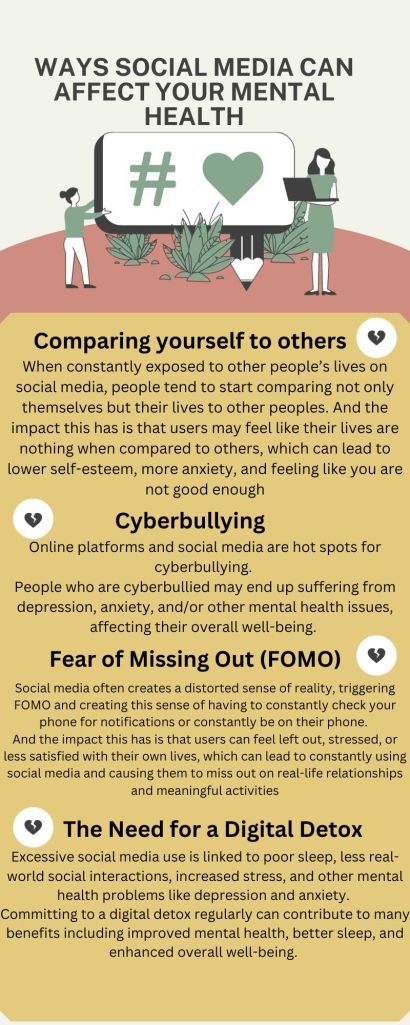
Social Media’s Impact on Your Mental Health

In today’s world, people are almost always glued to their phones, whether it be texting a friend on snapchat or viewing your favorite content creator’s new post on Instagram. Social media is everywhere, and it affects how we connect to each other, communicate, and how we go about our daily lives. Seeing everyone’s edited lives and feeling the need to fit in can make us feel stressed and not good enough. Scrolling through endless posts can mess with our emotions, making us anxious or like we’re missing out on stuff.  Social media impacts our lives in a number of ways, but these impacts aren’t always good, as it has been known to negatively affect people’s mental health. It’s like a tricky balance between staying connected online and taking care of our mental well-being. Social media isn’t all bad, but we’ve got to be mindful of how it makes us feel and how much we use it. 

The creation of this infographic was aided by a generative artificial intelligence tool, but was designed and fact-checked by me.

Navigating the Fundamentals of Photography 

Photography is more than just clicking a button; it’s an art form that requires skill, creativity, and a deep understanding of the technical aspects. When it comes to taking good photos, understanding the basics is key. This guide will help you understand the basics of photography and enhance your skills. 

Lighting and Exposure

Proper lighting is the cornerstone of every great photo. Experiment with natural light, you should avoid harsh midday sun, and look for soft, diffused light during the golden hours of sunrise and sunset. Understanding exposure, the balance between light and dark areas in a photo, is important. Adjust your camera settings or use exposure compensation to achieve the right balance and avoid overexposed or underexposed shots. There is a scale in your camera that will tell you what the exposure is when taking a photo. The scale will go from –2 to +2, the negatives being underexposed, and the positives being overexposed. The lowest I would go is –1 on that scale and I wouldn’t go higher than 0 as it can get too bright. Having my exposure at -1 is what I like to do because I tend to take darker pictures because I like them more and it is also easier to edit underexposed pictures and make them look good than it is for overexposed pictures. 

Framing

Composition plays a crucial role in photography and is almost as important as lighting. You should frame your subject thoughtfully and using the rule of thirds will help tremendously. Imagine your image divided into a grid of nine equal segments by two vertical and two horizontal lines, that is the rule of thirds. To use the rule of thirds effectively, you should place key elements along the lines in the grid or at their intersections to create a visually appealing composition. There is a setting on most, if not all cameras today, even on your phone, that you can turn on that will show that grid and help you frame your subject better. 

Getting Familiar with your Cameras Settings 

To improve your photo taking skills, you need to familiarize yourself with essential camera settings that give you control over your shots such as your ISO, Aperture, and Shutter Speed.

ISO measures your camera sensor’s sensitivity to light. You want to use lower ISO settings (100-400) in well-lit environments to maintain image clarity. In low-light conditions you should increase the ISO (800 and above) to capture clear photos without a flash but be cautious as high ISO values may introduce noise. Noise is when your photo has a lot of grainy like textures in it. 

Aperture refers to the size of the lens opening through which light enters the camera. It is measured in f-stops. A lower f-stop (e.g., f/1.8) means a wider aperture, allowing more light in and creating a shallow depth of field and makes the background blurry. Higher f-stops (e.g., f/11) result in a narrower aperture and gets rid of that blurriness in the background, suitable for capturing detailed landscapes with a broader focus range. 

Shutter Speed determines how long your camera’s shutter remains open, controlling the amount of light that reaches the sensor. Faster shutter speeds (1/500 and above) are ideal for freezing fast-moving subjects, while slower speeds (1/30 and below) create a sense of motion. You should use a tripod for stability when using slow shutter speeds to avoid blurry images caused by camera shake. Using lower shutter speeds also allows for more light to come in so you can lower your shutter speed for darker spaces or at night. 

Becoming a better photographer requires a combination of technical expertise, creativity, and continuous practice. By incorporating these basic techniques and fundamentals, honing your creative eye, and practicing, you’ll be well on your way to capturing much better photos. So, grab your camera and explore the world. 

Here is an article to read after you have an understanding of the basics and want to learn how to take even better photos.